I designed a timesheet app for 1,000+ Council field workers while building the organization's first digital design system.
Introduction
Nexus
Project Description here…
Role
Product Designer & Front-end Developer
Timeframe
4-6 weeks
Team
Myself, Team lead
Tools

Context
The Sunshine Coast Council manages 1,000+ field workers across parks, infrastructure, and waste services etc. Each department faced similar core problems, along with unique workflow challenges:
The main issues summarized,
Each supervisor/manager had to confirm each separate fieldworker submitted their timesheets, at times in person
Ensure fieldworkers assign the correct job costing codes, allowances, and entitlements
Fieldworkers don't want managers/supervisors creating or populating their timesheets
Easily creating infringements or service requests for fieldworkers already in the field
One team was organizing timesheet hours on a whiteboard, for fieldworkers to enter later, possibly meaning a lack of or difficult access to current systems
And more
These and many more problems were brought up when myself, team lead, and another developer in the DI Team along with some project managers from the Payroll team met up in person with fieldworkers in the various teams.
Problem
Fieldworkers had a complex and bloated timesheeting system, managers trying to ensure it was all correct, in time for payroll, raising issues with payroll at Council, leading to more time and money being spent on problematic software processes.
Desktop-first interfaces that were unusable in the field. Some teams couldn't access systems from mobile devices, forcing them to remember hours and enter them later (leading to errors and forgotten entries).
Managers had no way to quickly see who hadn't submitted timesheets, causing payroll delays and requiring manual follow-ups.
This wasn't just frustrating — it was costing real time and money across the organization.
Approach
With only 4 weeks to deliver and no design system to build from, I needed to work strategically:
Parallel-track design and infrastructure. Built reusable components while designing screens, validating each element with developers in standups to ensure .NET MAUI compatibility.
Prioritize the critical path, focusing first on timesheet submission (used weekly by 1,000+ workers) and manager approval, deferring nice-to-have features for a later date.
Design mobile-first, field workers are rarely at desks. Every interaction needed to work one-handed, in bright sunlight, with gloves on.
Build for simplicity. Nexus intrigued stakeholders at Council, and requirements might change quickly.
Discovery
I spent the first week understanding existing workflows with the team lead and gathering feedback from internal stakeholders who work directly with field staff.
Key insights from conversations with managers and IT:
"Workers only care about current and previous month" → This informed our decision to limit calendar navigation rather than showing full history.
"We need to see who hasn't submitted at a glance" → Led to status-based filtering and visual indicators on the manager dashboard.
"Job costing codes are critical for payroll accuracy" → Made these codes easily visible in timesheet entries.
"Anything that requires more than 3 taps won't get used in the field" → Shaped our interaction design to minimize navigation depth.
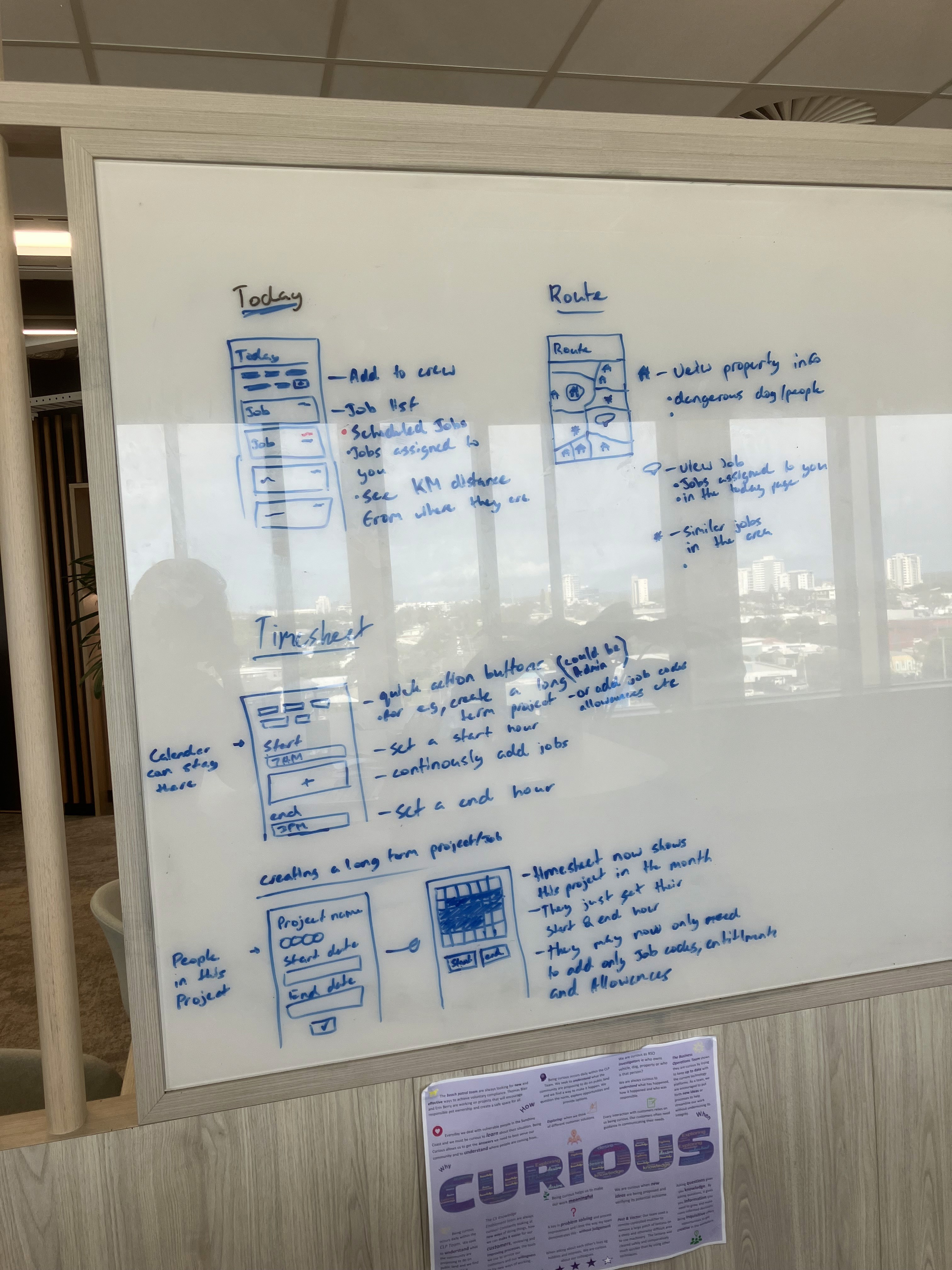
Example whiteboarding
Component Library
The Council had no digital design system — only a PDF of print brand guidelines showing logos, print colors, and typography for brochures. I needed to translate this into a streamlined design system, focusing on the core styles, leaving room to scale later.
The goal was to build something straightforward for Nexus while demonstrating—rather than just arguing—why a design system creates value. I wanted to show how Figma manages design variables at scale, then later demonstrate how this translates to code.
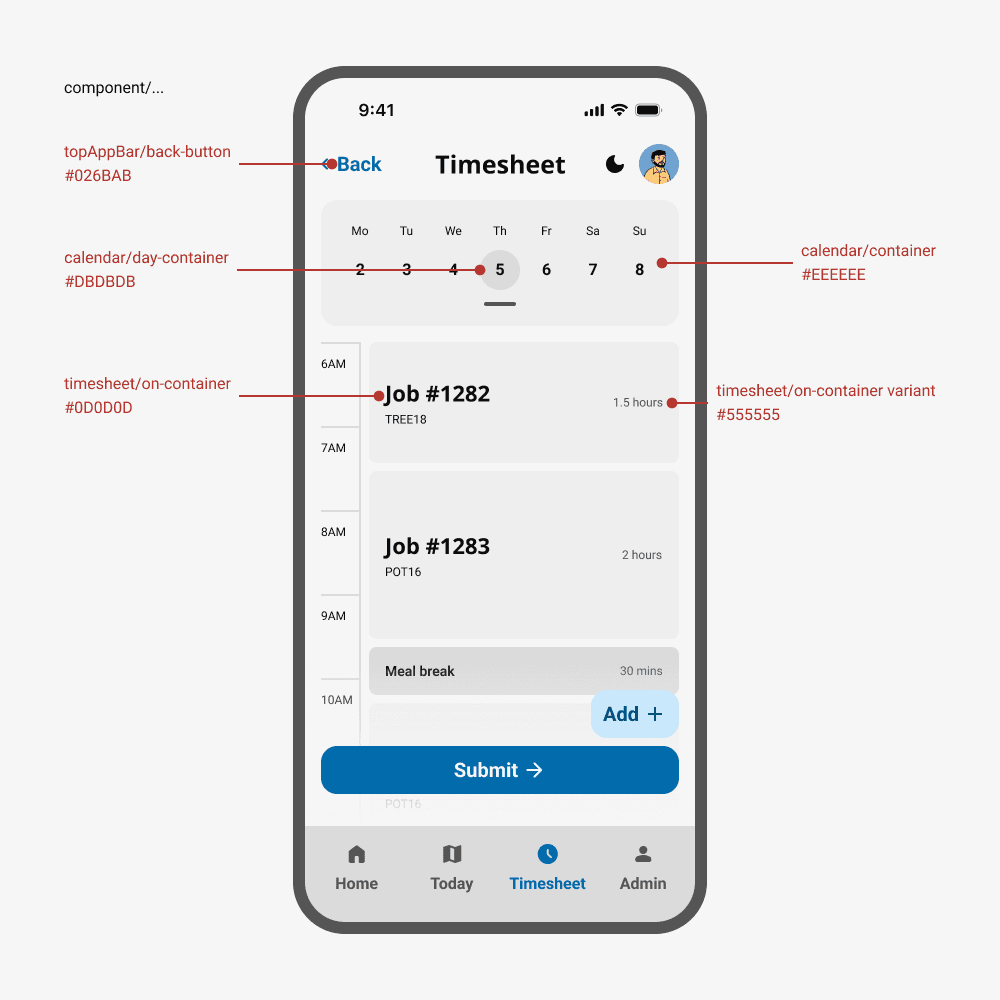
Color System
66 primitives
132 tokens
Adapted the Council's print colors into an accessible digital palette, ensuring all interactive elements met WCAG AA contrast requirements. Created semantic color tokens for success, warning, and error states.
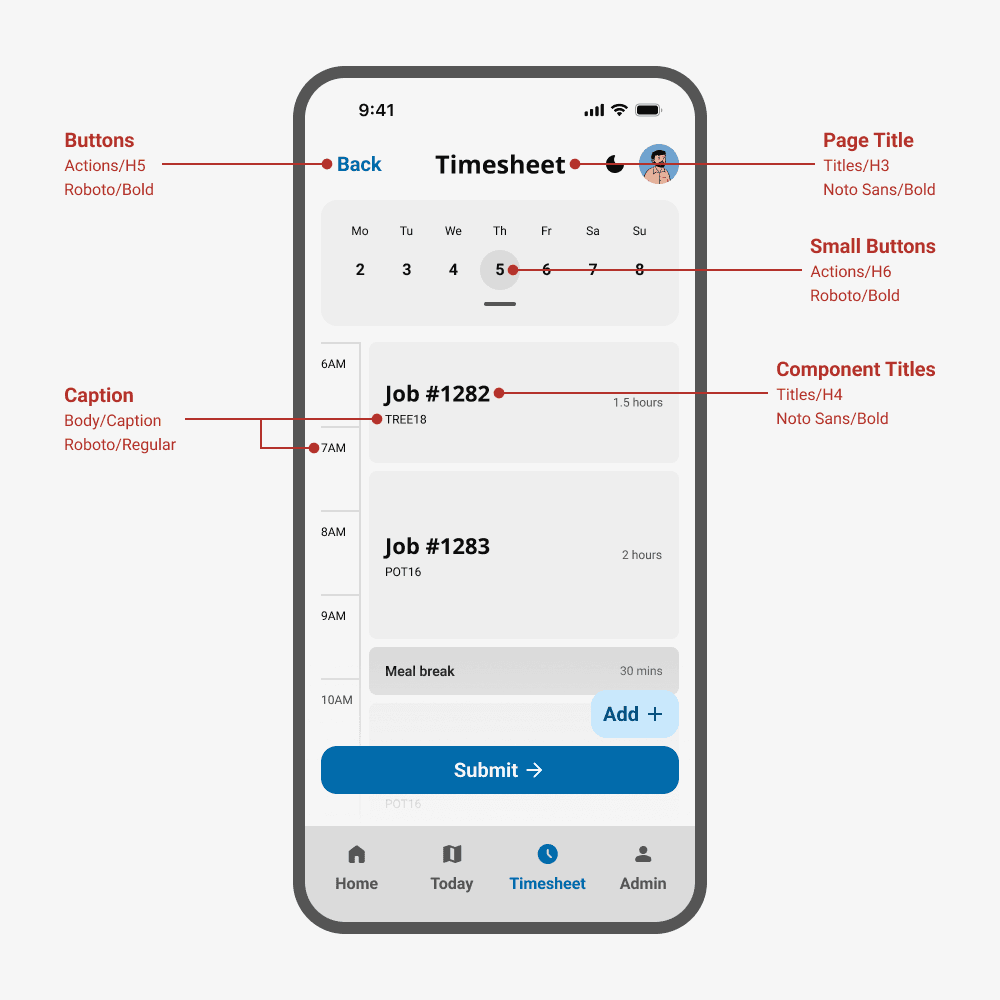
Typography & Hierarchy
11 styles
Established a type scale optimized for mobile readability with larger touch targets. Defined heading styles, body text, and UI labels that maintained brand consistency while improving legibility on small screens.
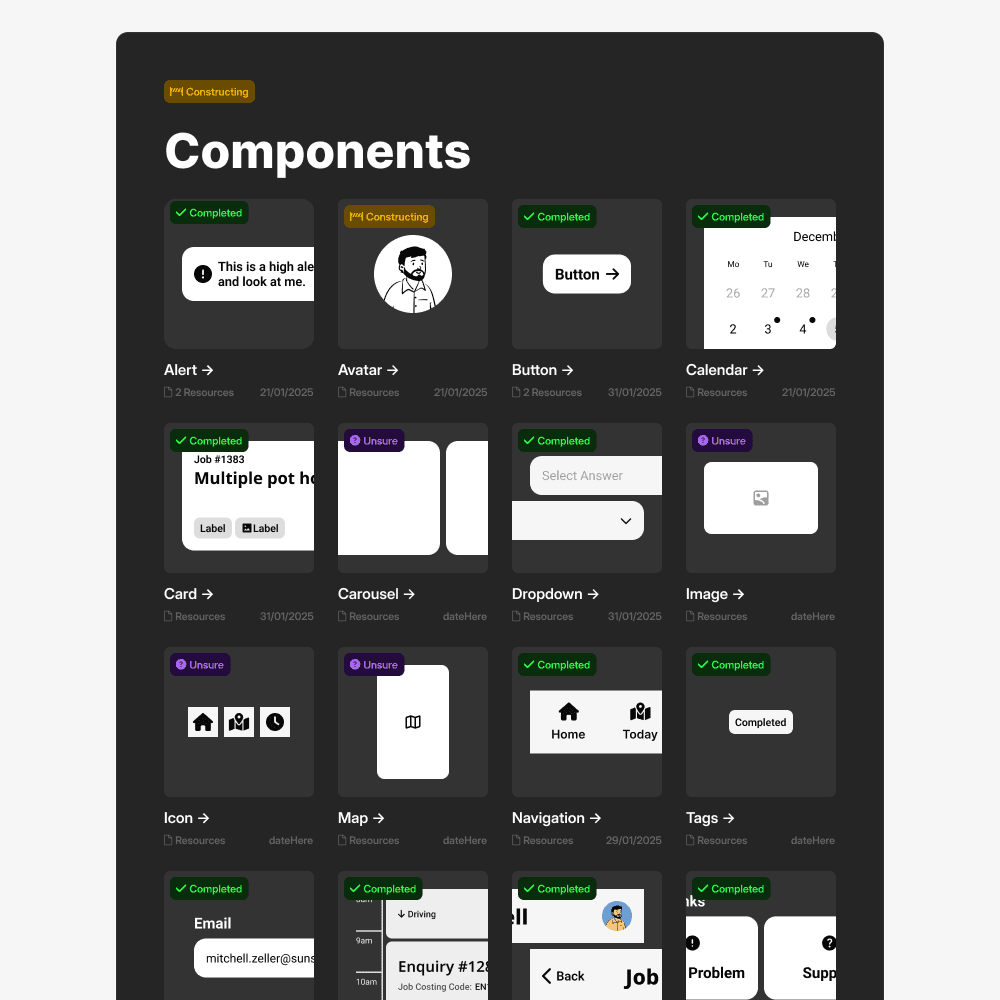
Component Library
12 core components
30+ variants
Built a library of reusable components: buttons, form inputs, cards, bottom sheets, modals, and navigation elements. Each component included variants for different states (default, hover, disabled, error).
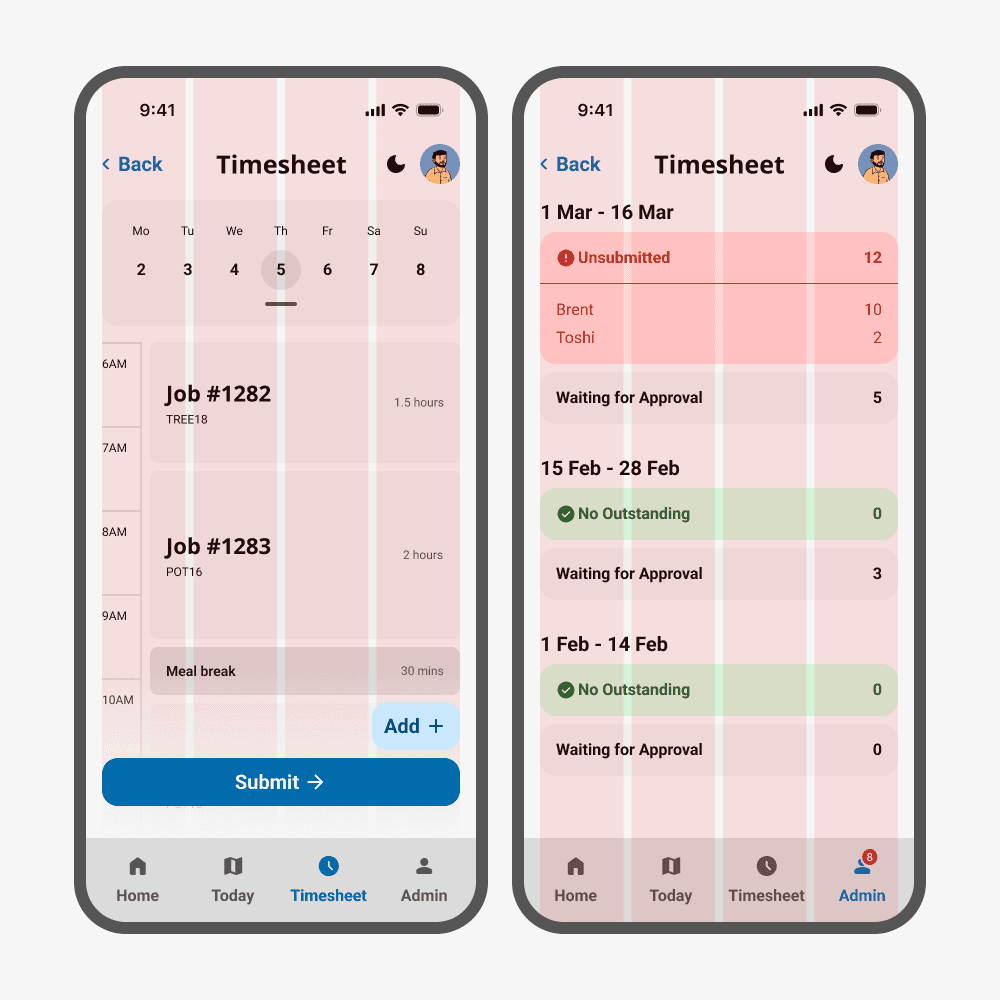
Spacing & Layout
margin: 16px
gutter: 8px
Implemented an 8px grid system to create consistent rhythm across all screens and ensure components aligned properly at different breakpoints.
Wireframing & Iteration
I began with whiteboard sessions to map user flows and information hierarchy, then moved into Figma for higher-fidelity wireframes.
Daily standups with developers were critical — they flagged technical constraints with .NET MAUI early, allowing me to adjust designs before investing time in detailed mockups.
A few key iterations based on feedback:
Both fieldworkers and managers only needed to access the current and previous month
Added allowances to the add-item flow on the timesheet screen for fieldworkers.
Adjusted the manager review interface, created a compact card-based view for reviewing multiple timesheets quickly, with the ability to tap into full details when needed.
Final Design
After multiple rounds of iteration and testing with the internal team, the design coalesced around three core areas
Field worker timesheet management
Manager approval workflows
Contextual homepage
Each was designed to minimize friction and reduce the cognitive load of administrative tasks.
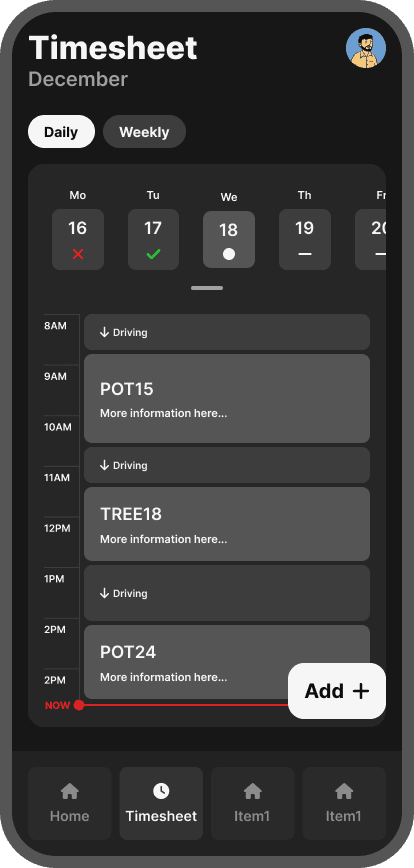
Early exploration
Wireframe
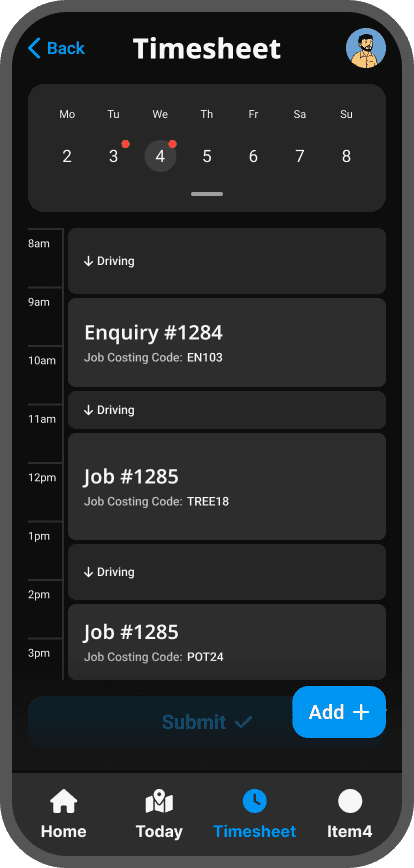
Final Design
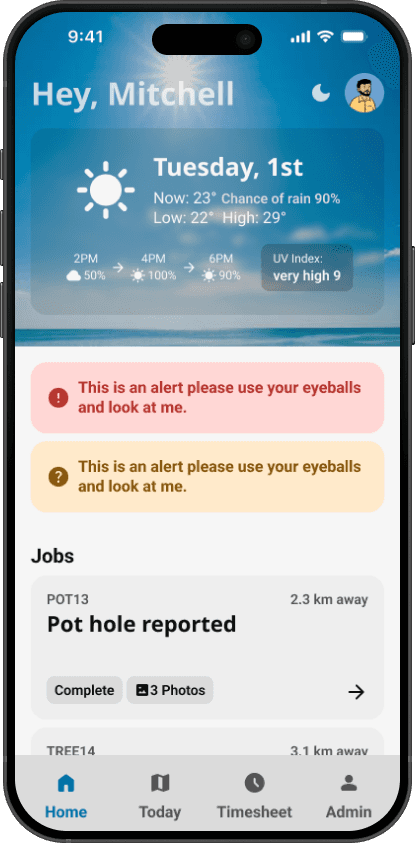
Homepage
Users are greeted with a weather card providing useful information, alerts in their area, and a list of jobs, and quicklinks for important information.
The weather card information is very useful for those working outside, understanding how the weather will be in the future and planning their jobs around such. The alerts here are just placeholder but would or could display information like a dangerous animal or person in the area. Below the jobs list is also a quick link section which leads to important information within the app or to external Council sites.
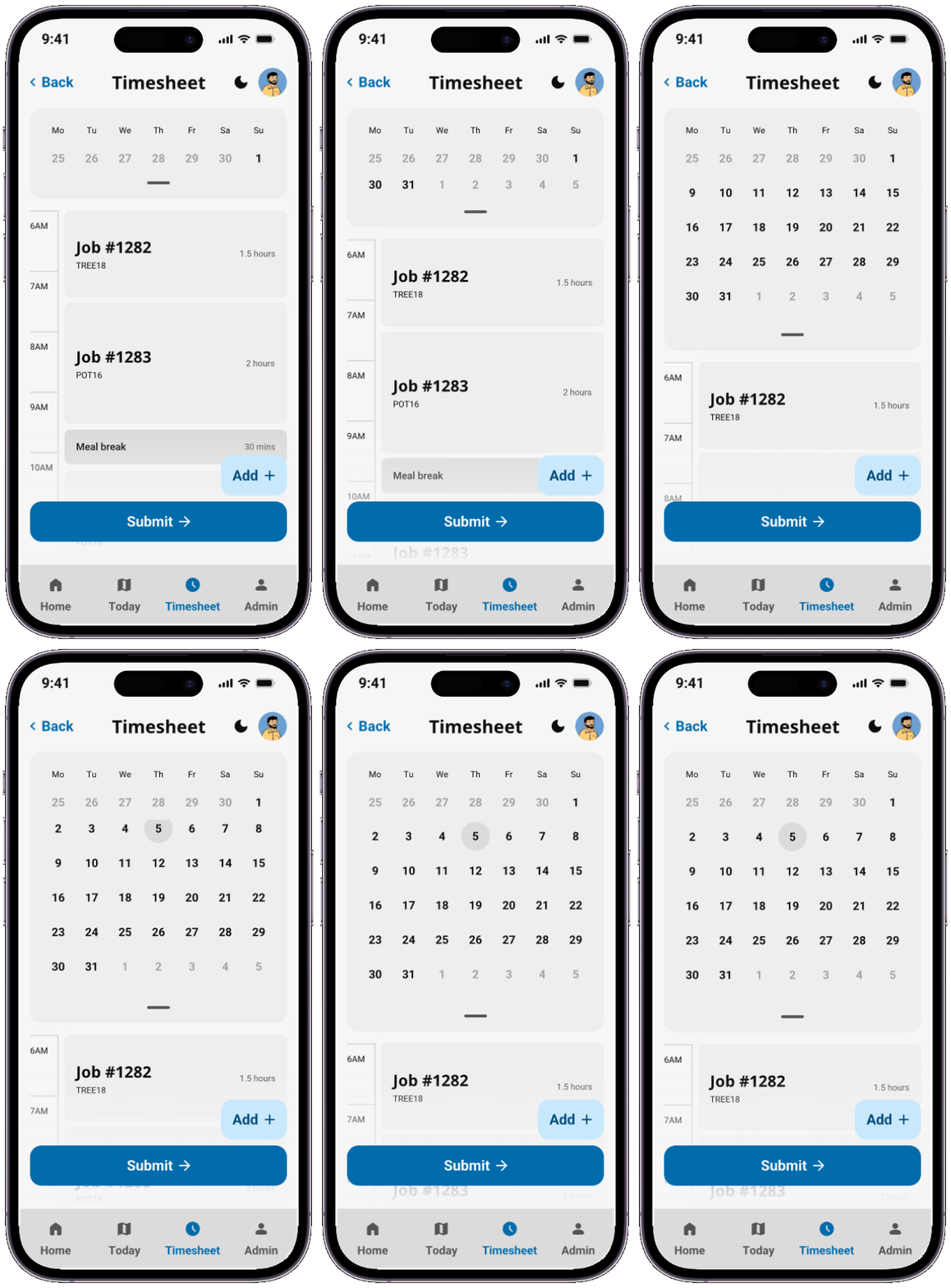
Timesheet Screens
Core Feature
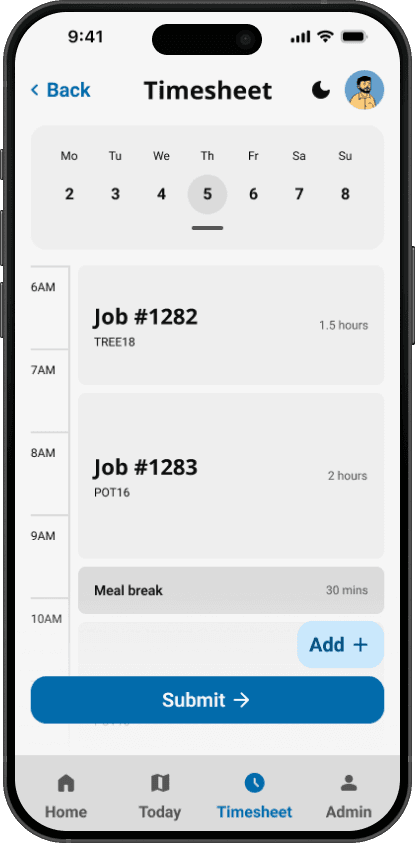
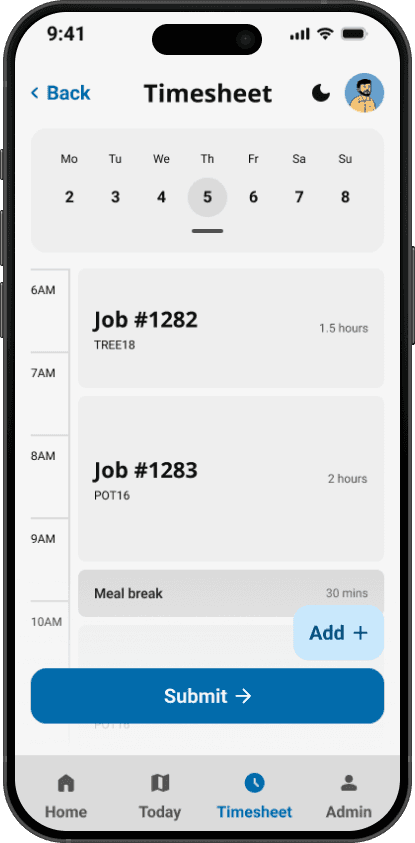
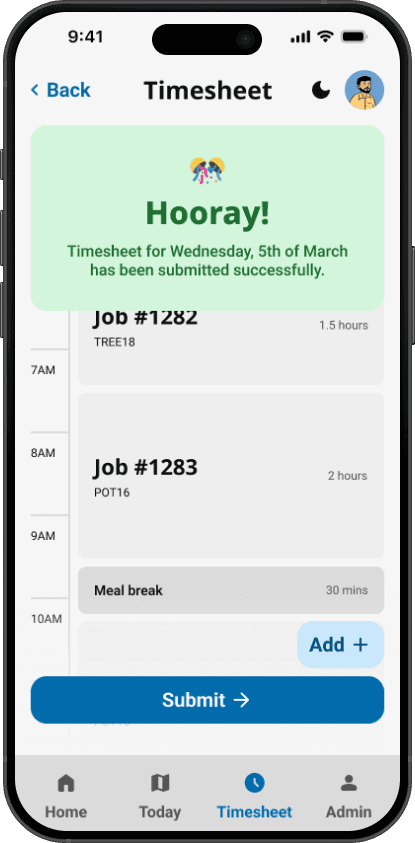
Users can manage their timesheets, add items to it and, submit for review.
Users can add items manually to their timesheet like allowances, breaks and jobs. They can also look at their previous days with the calendar component which was key to this page. Lastly the ability to of course submit their timesheets waiting for their manager/supervisor to review.

Manager/Admin Screens
Core Feature
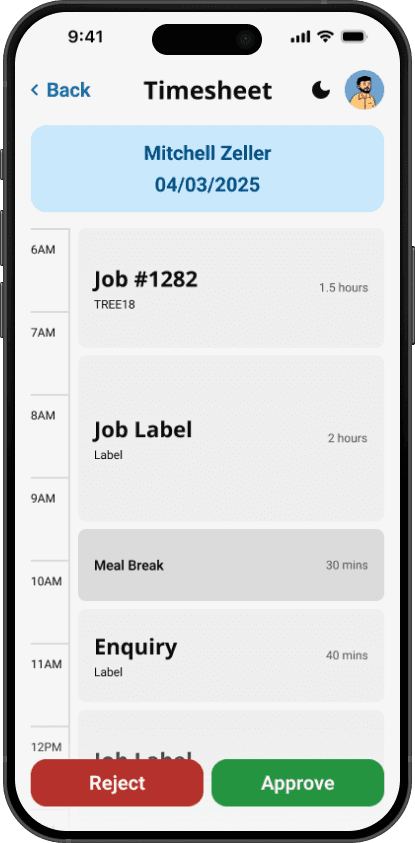
Managers or supervisors could view who is unsubmitted, filter by status, and review multiple days approving or rejecting.
Admins have three screens and can open up the full timesheet if needed for closer review. They can easily tell who hasn't submitted their timesheet yet for whichever previous or current month. Finally when reviewing an employees timesheet/s they are provided with a miniature view for each submitted timesheet along with allowances and the approve or reject button. If need be the manager could click the timesheet to open the full view and time etc.


Future Features
Concept
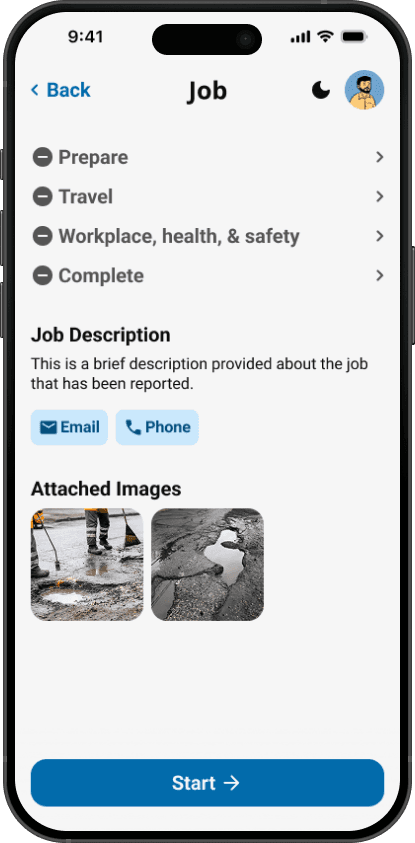
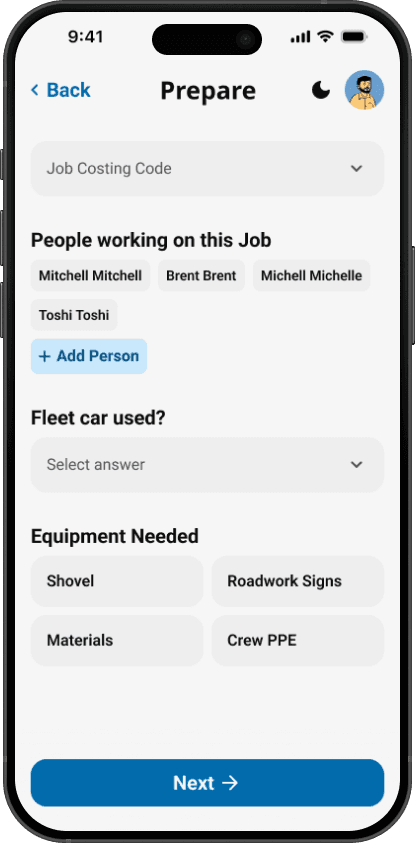
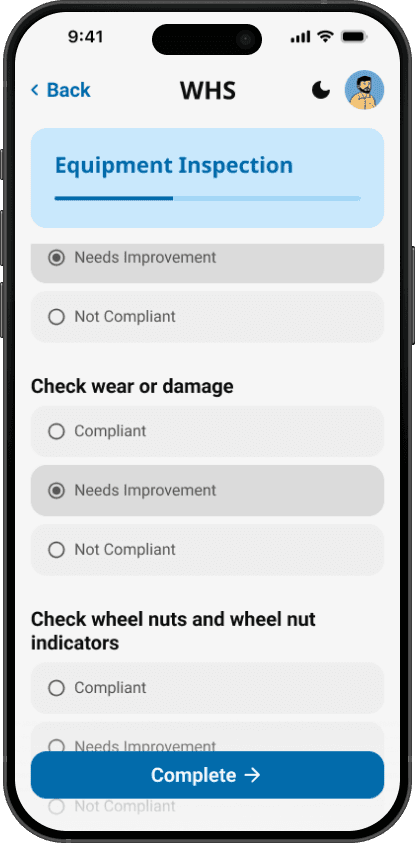
During scoping, we identified job management as valuable but deprioritized it to ship timesheet functionality first. I created exploratory concepts showing how job details, work health & safety forms, and navigation could integrate into the existing interface.
These concepts informed the backlog for post-launch iterations and demonstrated how the app could be extended to more complex workflows if and when needed.
Accessibility & Technical Considerations
Designing for field workers meant accounting for real-world constraints:
Mobile-first, thumb-friendly
Minimum 48px touch targets, with primary actions positioned in the thumb zone. Critical buttons placed at the bottom of screens for one-handed use.
High contrast for outdoor visibility
All text meets WCAG AA standards. Tested color combinations work in direct sunlight, with dirty screens, and for users wearing polarized safety glasses.
.NET MAUI compatibility
Worked closely with developers to ensure components could be built within framework constraints. Avoided custom animations or interactions that would require significant custom code.
Offline capability considerations
Designed assuming intermittent connectivity — workers can view and edit timesheets offline, with sync happening when back in coverage.
Outcome
The final design was presented to the CEO, Mayor, and Executive Leadership team. The project was put on hold, and I was unable to continue working on it during my internship, but it will be reviewed for implementation in 2026.
Projected impact based on current timesheet volumes:
500+ field workers saving ~5 minutes per week on timesheet entry (2,500 minutes = 40+ hours saved across the organization weekly)
50+ managers saving ~2 hours per week on approval workflows (100 hours saved weekly)
IT support reducing timesheet-related tickets by an estimated 60-70% (9-14 fewer tickets per week)
Design system adoption:
The component library I built for Nexus now serves as proof-of-concept for design systems at Council—demonstrating how unified components, colors, and typography create consistency while preventing accessibility issues from being re-solved on every project. This infrastructure could save hundreds of hours on future work and significantly reduce technical debt.
What I learned:
Building design systems under pressure requires ruthless prioritization — ship the 20% that enables 80% of use cases - Daily developer feedback prevents late-stage redesigns and builds better working relationships
Enterprise software doesn't have to feel like enterprise software — even internal tools deserve thoughtful design -
Sometimes the infrastructure you build (the design system) has more lasting impact than the features
Reflection
This was my first experience designing an enterprise tool from the ground up. The constraint of having no design system initially felt limiting, but became the most valuable part of the project.
If I were to revisit this project, I would:
Conduct field observations with actual workers, not just internal stakeholders
Test the prototype with at least 3-5 field workers before finalizing
Document the design system more thoroughly for handoff to future designers and developers
Explore offline-first architecture more deeply in the initial scoping The project reinforced that good design solves immediate problems while building infrastructure for future ones
Argue for starting an internal design system project/team
Rather then use component based color tokens, use a base set of colors that all components can take from, setting up default, tertiary, secondary, and primary etc